I’ve been working in IT for more than 20 years now. There are many reasons why I have maintained a digital hoard of outdated executables and installers, but the time has come to make an effective plan for clearing out some debris. In this post I want to look at some of the various reasons maintaining a library has been helpful and necessary. I want to then identify a path forward to clear out all this digital rubbish. Creating a file management plan like this has applicability to all of us as individuals, as the digital debris we leave behind may become more overwhelming for our loved ones than physical possessions. This topic has serious relevance to businesses, as clearly defined and documented retention policies are more likely to be followed. These retention policies are recommended as one method to reduce several different risks to businesses.
How this impacts me
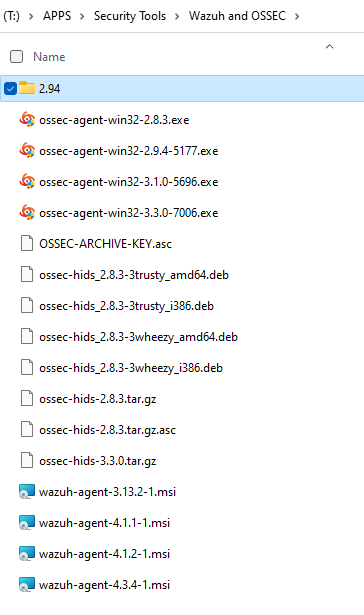
As seen in this screenshot, keeping various versions of files is an easy activity to get carried away with.
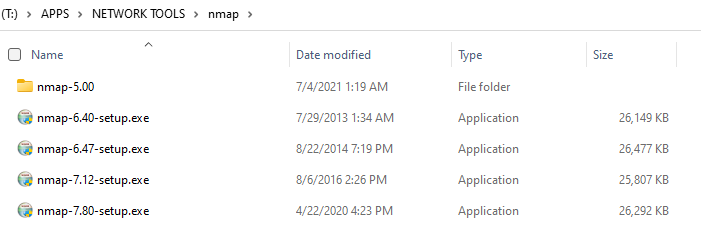
Some of the reasons I have kept files is very important to note, and there can be legitimate reasons to keep multiple versions handy. And this isn’t an issue when we are talking about small(ish) files like these nmap installers:
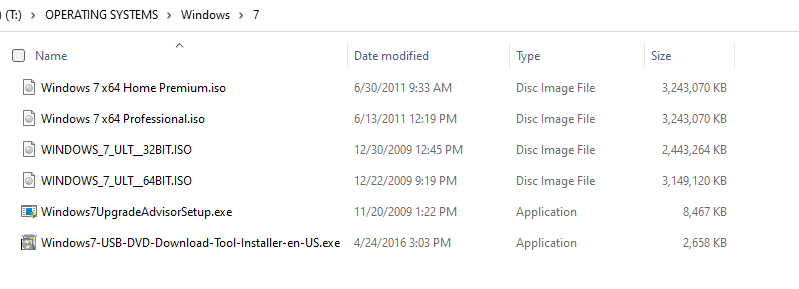
But… this becomes a huge space consumer when we start looking into entire operating systems backed up as .ISOs, .IMGs, and .DMGs. Windows 7 became end of life on January 14, 2020 and Windows 8.1 will be EOL less than 5 months from this post on January 10, 2023. If I was to have to reinstall an OS on an old computer, I will never install Windows 7. The only reason I have kept these old .ISOs was to become nostalgic and take them for a spin in a VM. This is ridiculous, who has time for that? This size issue has become a huge burden since I started working with CyanogenMod and LineageOS for Androids. It is also a pain due to offline versions of iOS that I needed to maintain for some work functions a few years back.
- Often times developers will deprecate entire programs and do everything they can to pull access to this code. (Microsoft does this often!)
- This leads to a situation where they only place to download a very useful program is some shady random website. And anyone with a bit of security knowledge understands that it’s trivial to wrap some malware around another executable.
- For a while I was hosting an online and freely accessible “Toolbox” with installers in this same way. And then I realized I am really not helping this problem. If someone downloads something from my site and it’s clean, that same individual may think that it’s also OK to download something else from another random site. This is proliferating bad behavior, and I don’t want to be part of this any longer.
- This leads to a situation where they only place to download a very useful program is some shady random website. And anyone with a bit of security knowledge understands that it’s trivial to wrap some malware around another executable.
- Some times a new version comes out and is incompatible with my current OS. Or a feature is deprecated or broken in a new version.
- If work is going to be done offline and far away from an Internet connection, then having a giant toolbox is very helpful.
- This was essential when I was a Peace Corps volunteer, and common practice before people started tethering phones as hotspots.
- The irrational fear that the Internet would be disrupted severely enough that I needed to hoard access as a means to fix computers in a world that was permanently offline.
- As I’ve grown older, I realize that if this ever happened I have fear that society as a whole would suffer heavily. This means there is significant incentive and momentum in our country for this situation to not occur.
- And therefore if it really did occur, fixing computers will not be a high priority for me.
- It is this same argument that a lot of people, including myself, still own their physical CDs and DVDs, but subscribe to streaming services.
- And therefore if it really did occur, fixing computers will not be a high priority for me.
- As I’ve grown older, I realize that if this ever happened I have fear that society as a whole would suffer heavily. This means there is significant incentive and momentum in our country for this situation to not occur.
With some of those easy reasons out of the way, it’s not hard to imagine the proliferation of executables over the last several years.
My plan to excise some of this waste:
- Identify the two most recent versions of an executable or .ISO I have.
- In the case of an Operating System, if it is EOL it should be deleted.
- Delete everything older.
- When I download an updated version of something, delete the older version.
I have no reasonable way to guess the amount of time this will take. Also, I am not entirely sure whether as my colleague Jeff would say “is the juice worth the squeeze?” I am aware that my hoarding has now caused a sufficient lack of disk space on a rather expensive SSD, and it’s absurd for me to keep this junk any longer.
I wish you all luck. Digital hoarding may be both easier to start and clean up than physical hoarding. I am finding it is just as important to clean out your digital space as it is the physical. Buying a new hard drive just because you run out of space is the digital equivalent of people getting storage lockers because they run out of space in their house.
Closing
I want to come back and address this topic separately for its impact to YOU my reader, as well as to IT leaders that may find this relevant to their businesses.