Category: Security

Workspace ONE syslog: It’s 2026, your company still needs it, and how to make it work better!

Imagine the following scenario you’re an administrator for a Workspace ONE and you have been asked by your Information Security (IS) team for some data to help correlate device or user behaviors. Maybe you want to see some additional trend data and you don’t have access to Omnissa Intelligence.

Whatever situation you find yourself in, it’s worth keeping in mind that Omnissa UEM SaaS environments only keep operational log data 30-days. If you have been an IT or IS team member for any length of time, you have probably noticed that 30-days goes by quickly and it’s frequently necessary to look back farther than that to understand deviations from standard patterns.

Fortunately, Workspace ONE UEM still offers a syslog export. For SaaS customers (and that should be nearly all of you soon!) this is most often sent down over your AirWatch Cloud Connector and forwarded to your syslog receiver.

Unfortunately, the UEM syslog feed still needs a lot of attention to get the most out of it.

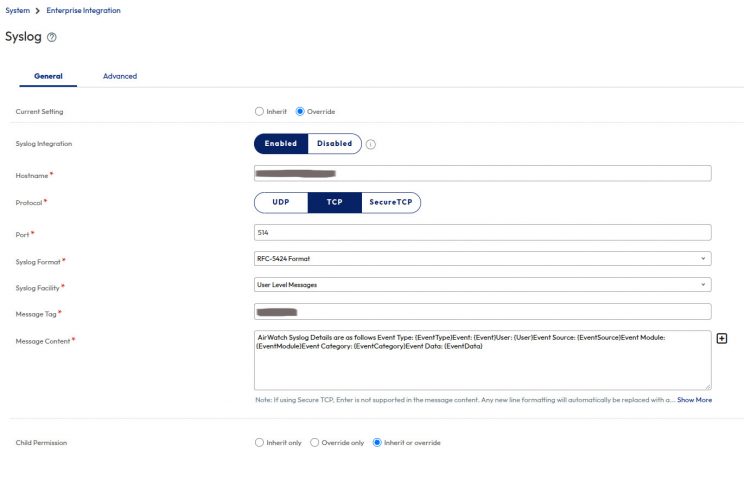
The default message content looks like this:

AirWatch Syslog Details are as follows Event Type: {EventType}Event: {Event}User: {User}Event Source: {EventSource}Event Module: {EventModule}Event Category: {EventCategory}Event Data: {EventData}

Recommendations for making this more useful:

  1. Change the log format to the modern RFC-5424.
    1. Follow the guidance of your SIEM or syslog tool administrator if you are unsure of which to use.
    2. RFC-5424 is the best choice and it is a newer format.
    3. If you already ingesting syslog, do NOT change this without discussing this with the SIEM or syslog administrator. Changing anything will have the biggest effect on downstream systems and you may have no visibility into what they have already setup.
  2. Change the Message TAG to the console and OG this is coming from.
    1. This is really helpful to identify which environment the logs come from. Many customers have a UAT environment that gets sent to the same syslog receiver.
  3. Adjust the formatting to make the logs send key value pairs (KVPs) to the SIEM. There are a lot of random spaces and punctuation marks in the {Event} data that can really mess up the SIEMs ability to automatically ingest and parse the data.
    1. By default the syslog Message Content needs to have a delimiter added between the “}” and the next entry. Many modern SIEM tools *should* be able to recognize a key-value pair (KVP) when they see one, but this default configuration really messes with it.
    2. Defer to your SIEM or syslog administrator if you are unsure.
  4. Remove the text AirWatch Syslog Details are as follows
    1. This is not useful at all to a downstream tool and takes more work to strip it out. Plus think of all the extraneous 1s and 0s being sent…that’s wasted electricity and disk space. Every bit count right?
  5. Add EnrollmentUser and DeviceFriendlyName values
    1. If these are not relevant to the log entry that comes through… they will be blank. Otherwise these could have very valuable information for correlating entries across devices and users.
      1. By default the other {Event} fields only contain the NUMERIC ID for a device or user. This is not human friendly data and requires a separate lookup back against WS1.

Screenshot of Workspace ONE UEM with most syslog settings at default values


Here is what the format looks like if you follow the above steps:

event_type=”{EventType}” event=”{Event}” user=”{User}” event_source=”{EventSource}” event_module=”{EventModule}” event_category=”{EventCategory}” event_data=”{EventData}” enrollment_user=”{EnrollmentUser}” device_friendly_name=”{DeviceFriendlyName}”
Fully disabling remote access to root on MariaDB

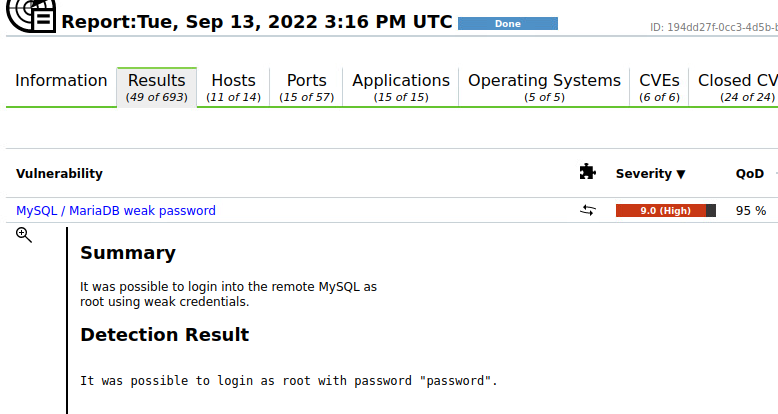
An OpenVAS vulnerability scan helped me recently identify a DB that had a 9.0 rating and was allowing remote access to the root account. Thankfully the DB was not accessible to the Internet, but the ease of lateral movement inside a server network couldn’t be allowed. So I went about responsibly mitigating this vulnerability, which I did not expect to have taken as long as it did. Turning off remote access should be easy, even thought I’m not a DBA, I felt confident this would not be that difficult. I read the free manual and didn’t not see any major challenges.


First off, I’m not a DBA, second this was the first install of mariaDB that I knowing was getting involved with. I don’t think the differences between MySQL are that significant, but I had to keep it in mind.

First step was to change the root password. At least make sure it wasn’t using the default password of password to log in. Seriously. I don’t know if this is set this way by mariaDB during installation, or was set by the application using the DB.

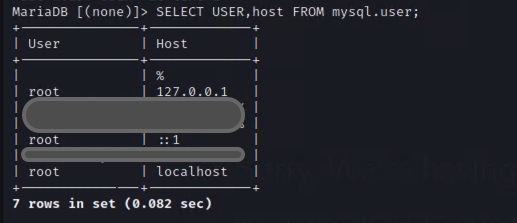
Changing the root password was insufficient. The scan still returned the vulnerability existed. Turns out I had only changed it for the localhost version of root. I was interested to learn and understand that different DB users can share the same login name, so long as their hosts are different.

So then I changed the password for 127.0.0.1, and and ::1 to account for the IPV6 change. This was still insufficient to stop the vulnerability from showing up.

I modified the my.cnf and still had no success.

I had to manually verify this existed, something I should have done earlier. It’s always possible for a vulnerability scan to show a false-positive, and every finding should be checked out before reporting it. All the verification necessary came from a different host with a simple command:

mysql -u root -h 10.20.30.xx -p

And I had root access to the DB application running on this host. And of course with MySQL access and root DB permissions, it wouldn’t be difficult or long for someone to take control of that server. This was getting frustrating. If the hashes in the mysql.user table were clearly showing that the password was changed, then what was I missing?

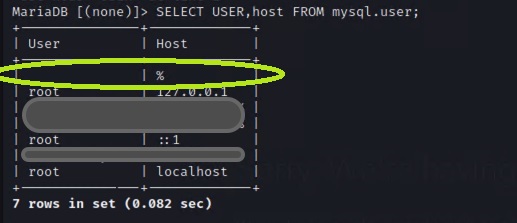
At this time I need to remember that I am not a DBA, and I had no clue that there was a “ghost” user in the system. I say ghost because the username actually had no value, but they could access the system from any IP address.

Thankfully I found this post https://dba.stackexchange.com/questions/4614/cannot-drop-anonymous-user-from-mysql-user. Suddenly I realized that this wasn’t as much of an issue with being able to log in as root, rather it was blocking anonymous access to the DB. Semantics? Part of me is curious if I could have logged in with a username of PapaJohn and had it work.

Quickly removing that user from the mysql.user table was all it took to mitigate that vulnerability.

DELETE FROM mysql.user WHERE user='' AND host='%';
FLUSH PRIVILEGES;


I did learn today that anonymous access exists on a default MySQL or MariaDB installation. I learned that there is a test DB created by default that needs removing also. An excellent writeup on how to clean a default installation can be found here: https://www.loginradius.com/blog/engineering/is-your-database-secured-think-again/.

I am grateful that this is solved, and I’m thankful I don’t have to scold the application developer for having done this. I am troubled however at a new installation being left open to the wild by default. This is a solid reminder that the need for highly trained engineers is greater than ever, for this inexcusable default configuration for MySQL will not be caught in many of the SMBs that I have traditionally supported. Only due to a vulnerability scan did this even get flagged for the customer, and only through persistence did it get mitigated. A highly trained DBA should have known this in-advance, and known to delete these items immediately after a fresh install. Sadly I think the MySQL and MariaDB communities are doing a disservice to SMBs that lack dedicated DBAs and trust in the communities to provide software that is secure enough to use.


So for anyone that needs to search why they can log into a MySQL DB server remotely using the root account and the default password, consider that it may have nothing to do with root at all. Disable anonymous access to the DB, and then worry about changing the password for root.

Commercialization of Facial Recognition will eliminate privacy for the future generations

Individual privacy in the face of artificial intelligence, biometric facial recognition, and big data is increasingly under threat of disappearance from our government, technology companies, and society’s own best intentions. Unnecessary government intrusion into the private lives of citizens in the United States is a right protected by law. Due to extra-governmental advancements in biometrics and facial recognition technology, circumvention of the law is being made possible. Often the desire for additional surveillance technology comes from society’s perceived need for additional security through detection and observation. Long-term implications on individual privacy and the negative consequences of privacy loss from forming a surveillance society will be most damaging to the children and grandchildren of today.

Read more