Imagine the following scenario you’re an administrator for a Workspace ONE and you have been asked by your Information Security (IS) team for some data to help correlate device or user behaviors. Maybe you want to see some additional trend data and you don’t have access to Omnissa Intelligence.
Whatever situation you find yourself in, it’s worth keeping in mind that Omnissa UEM SaaS environments only keep operational log data 30-days. If you have been an IT or IS team member for any length of time, you have probably noticed that 30-days goes by quickly and it’s frequently necessary to look back farther than that to understand deviations from standard patterns.
Fortunately, Workspace ONE UEM still offers a syslog export. For SaaS customers (and that should be nearly all of you soon!) this is most often sent down over your AirWatch Cloud Connector and forwarded to your syslog receiver.
Unfortunately, the UEM syslog feed still needs a lot of attention to get the most out of it.
The default message content looks like this:
AirWatch Syslog Details are as follows Event Type: {EventType}Event: {Event}User: {User}Event Source: {EventSource}Event Module: {EventModule}Event Category: {EventCategory}Event Data: {EventData}
Recommendations for making this more useful:
- Change the log format to the modern RFC-5424.
- Follow the guidance of your SIEM or syslog tool administrator if you are unsure of which to use.
- RFC-5424 is the best choice and it is a newer format.
- If you already ingesting syslog, do NOT change this without discussing this with the SIEM or syslog administrator. Changing anything will have the biggest effect on downstream systems and you may have no visibility into what they have already setup.
- Change the Message TAG to the console and OG this is coming from.
- This is really helpful to identify which environment the logs come from. Many customers have a UAT environment that gets sent to the same syslog receiver.
- Adjust the formatting to make the logs send key value pairs (KVPs) to the SIEM. There are a lot of random spaces and punctuation marks in the {Event} data that can really mess up the SIEMs ability to automatically ingest and parse the data.
- By default the syslog Message Content needs to have a delimiter added between the “}” and the next entry. Many modern SIEM tools *should* be able to recognize a key-value pair (KVP) when they see one, but this default configuration really messes with it.
- Defer to your SIEM or syslog administrator if you are unsure.
- Remove the text AirWatch Syslog Details are as follows
- This is not useful at all to a downstream tool and takes more work to strip it out. Plus think of all the extraneous 1s and 0s being sent…that’s wasted electricity and disk space. Every bit count right?
- Add EnrollmentUser and DeviceFriendlyName values
- If these are not relevant to the log entry that comes through… they will be blank. Otherwise these could have very valuable information for correlating entries across devices and users.
- By default the other {Event} fields only contain the NUMERIC ID for a device or user. This is not human friendly data and requires a separate lookup back against WS1.
- If these are not relevant to the log entry that comes through… they will be blank. Otherwise these could have very valuable information for correlating entries across devices and users.
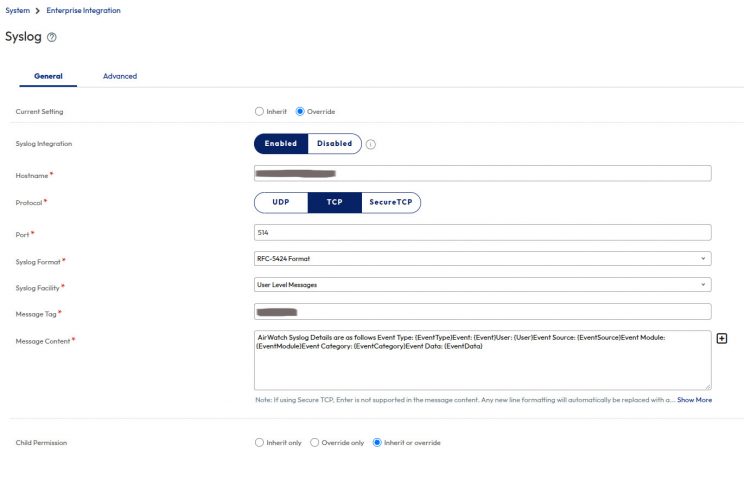
Here is what the format looks like if you follow the above steps:
event_type=”{EventType}” event=”{Event}” user=”{User}” event_source=”{EventSource}” event_module=”{EventModule}” event_category=”{EventCategory}” event_data=”{EventData}” enrollment_user=”{EnrollmentUser}” device_friendly_name=”{DeviceFriendlyName}”