Tag: mobile devices

Workspace ONE syslog: It’s 2026, your company still needs it, and how to make it work better!

Imagine the following scenario you’re an administrator for a Workspace ONE and you have been asked by your Information Security (IS) team for some data to help correlate device or user behaviors. Maybe you want to see some additional trend data and you don’t have access to Omnissa Intelligence.

Whatever situation you find yourself in, it’s worth keeping in mind that Omnissa UEM SaaS environments only keep operational log data 30-days. If you have been an IT or IS team member for any length of time, you have probably noticed that 30-days goes by quickly and it’s frequently necessary to look back farther than that to understand deviations from standard patterns.

Fortunately, Workspace ONE UEM still offers a syslog export. For SaaS customers (and that should be nearly all of you soon!) this is most often sent down over your AirWatch Cloud Connector and forwarded to your syslog receiver.

Unfortunately, the UEM syslog feed still needs a lot of attention to get the most out of it.

The default message content looks like this:

AirWatch Syslog Details are as follows Event Type: {EventType}Event: {Event}User: {User}Event Source: {EventSource}Event Module: {EventModule}Event Category: {EventCategory}Event Data: {EventData}

Recommendations for making this more useful:

  1. Change the log format to the modern RFC-5424.
    1. Follow the guidance of your SIEM or syslog tool administrator if you are unsure of which to use.
    2. RFC-5424 is the best choice and it is a newer format.
    3. If you already ingesting syslog, do NOT change this without discussing this with the SIEM or syslog administrator. Changing anything will have the biggest effect on downstream systems and you may have no visibility into what they have already setup.
  2. Change the Message TAG to the console and OG this is coming from.
    1. This is really helpful to identify which environment the logs come from. Many customers have a UAT environment that gets sent to the same syslog receiver.
  3. Adjust the formatting to make the logs send key value pairs (KVPs) to the SIEM. There are a lot of random spaces and punctuation marks in the {Event} data that can really mess up the SIEMs ability to automatically ingest and parse the data.
    1. By default the syslog Message Content needs to have a delimiter added between the “}” and the next entry. Many modern SIEM tools *should* be able to recognize a key-value pair (KVP) when they see one, but this default configuration really messes with it.
    2. Defer to your SIEM or syslog administrator if you are unsure.
  4. Remove the text AirWatch Syslog Details are as follows
    1. This is not useful at all to a downstream tool and takes more work to strip it out. Plus think of all the extraneous 1s and 0s being sent…that’s wasted electricity and disk space. Every bit count right?
  5. Add EnrollmentUser and DeviceFriendlyName values
    1. If these are not relevant to the log entry that comes through… they will be blank. Otherwise these could have very valuable information for correlating entries across devices and users.
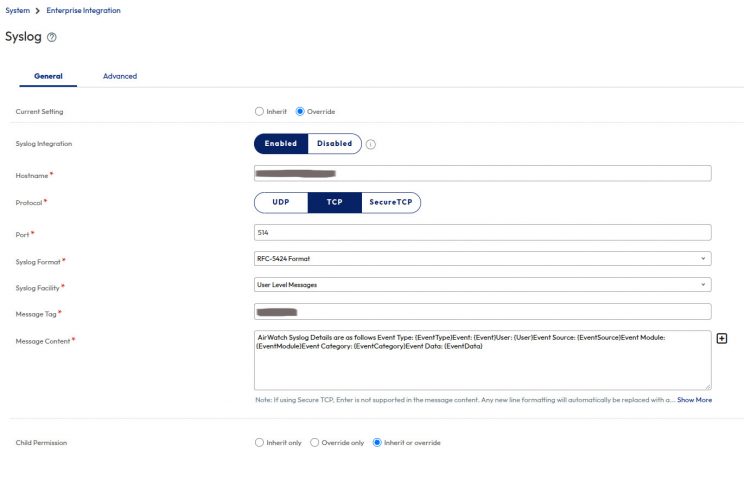
      1. By default the other {Event} fields only contain the NUMERIC ID for a device or user. This is not human friendly data and requires a separate lookup back against WS1.

Screenshot of Workspace ONE UEM with most syslog settings at default values


Here is what the format looks like if you follow the above steps:

event_type=”{EventType}” event=”{Event}” user=”{User}” event_source=”{EventSource}” event_module=”{EventModule}” event_category=”{EventCategory}” event_data=”{EventData}” enrollment_user=”{EnrollmentUser}” device_friendly_name=”{DeviceFriendlyName}”
Google's definition for impractical

BYOD makes your organization less secure because it is impractical


Google's definition for impractical
definition from www.Google.com

BYOD which stands for Bring Your Own Device is a common topic lately amongst the IT Crowd.  It’s one particular method for dealing with the escalating interest of employees wanting to do more work from tablets or smartphones.  The strategy is as straight forward as it gets, let the employees bring whatever device they choose to work on, and the IT department will decide what and how the employee can or can’t do that work.  While great on paper, the practical reality of a BYOD strategy is what makes it so ineffective.

If you’re still reading this, I’m going to assume you have an interest in IT, and particular the future of mobile technology in the workplace.  It’s likely you have  read articles, watched Gartner webcasts, and possibly even participated to some extent in a BYOD scenario.  It’s also very possible you are reading the above and thought to yourself “Whoa! What the heck are you talking about, BYOD is a bad idea?”

BYOD on paper is a great idea, but it’s impractical to think it will simultaneously meet all of an IT departments security needs and the productivity desires of employees.  The technology used for BYOD, known as a “secure container” is a special app or space on a device where all the company apps are stored in.  The container is easily thought of as a locked box inside your device, where the IT department squirrels away the company data.  Unfortunately the container really isn’t where most of your employees are going to do their work.

The concept of BYOD is impractical because it derives from the belief that staff members will only do their work in the way that an IT department believes staff should do their work.  BYOD revolves around how an organization can predict or worse dictate how their staff will utilize a mobile device to accomplish their work.  A BYOD strategy is incapable of acknowledging all the faster, easier, and sexier ways employees can and will get this work done outside the container.  Because of this impractical expectation, BYOD programs are less secure than the IT staff behind them intend.

BYOD exists as a reaction from the world of IT Security and other IT groups over their ever burgeoning workload. They have allowed themselves to be distracted by the belief that work functions will be safe and secure if it is only accessed through this container. This is impractical and counter-productive on a device that is designed to allow people freedom to work however they want.

LOLCAT being distracted by something shiny - http://s9.photobucket.com/user/Pritchard71/profile/
Distracted by Shiny Device – image from Pritchard71

It’s impractical to believe this container is going to provide all the technology necessary for employees to fully realize the capabilities mobility can bring them.  The container doesn’t matter when your business counts on enabling the versatility of your employees. When an employee is at an important event, they don’t have time to enter the container every time they need to take a note or a picture.  They will use whatever app they are used to, and they will “copy that to the container later.”  The container has not prevented data leakage.

When was the last time you emailed something to your work address from your personal address?  It’s a very easy thing to do.  It doesn’t matter if staff sign an agreement, once the data is outside the container, it is outside the control of IT.  The harder it is for someone to use their mobile device to perform work functions, the more encouraged they may be to find a way around your controls. Is it easier to work on your full-featured document editing app that came with the tablet, or the restricted editor in the container?  People send documents through Dropbox or their Google Drive all the time because it is easier and often faster than using the mechanisms provided by their company.  It really doesn’t matter how great your written policy is, people will work how they want to work.  Shadow IT is a term today because IT departments are spending too much time restricting the tools people want to use to be more productive.

Because BYOD is impractical and drives your staff further away from playing by the rules, the alternative of company-provided equipment is the only way to securely enable mobility for your people. If you are asking your staff to work on a device, give them a secure device that does its best to stay out of the way of the person using it.  To provide a secure device that provides as much capability as possible is a difficult recipe to get correct, and any IT department is going to approach these devices in a new, but similar fashion to traditional endpoints like desktops and laptops.

The alternative to BYOD, that of corporate-owned devices is a follow-on topic to this. Look for that shortly!